Elevate Your Packaging Presentations with the Dropper Bottle Mockup
In the highly competitive world of cosmetic and pharmaceutical branding, first impressions are everything. Whether you are a seasoned packaging designer or a startup founder launching your first serum, the way you present your product can make or break a sale. This is where professional-grade visual assets become indispensable. The Dropper Bottle Mockup offers a sophisticated solution for showcasing liquid products in a realistic, high-fidelity environment without the need for expensive physical prototyping.
This tool is not just a static image; it is a dynamic workspace designed to streamline your workflow while ensuring your designs look pristine. By leveraging modern digital tools, you can transition from concept to client-ready presentation in a fraction of the time it used to take. Let’s explore why this specific mockup has become a staple in many design studios and how it fits into contemporary creative workflows.
The Power of Realistic 3D Display
Gone are the days when flat JPEGs were sufficient for convincing stakeholders or impressing potential clients. Modern consumers have been trained by high-end advertising to expect realism. They want to see texture, lighting, shadows, and reflections that mimic real-world conditions. A realistic 3D display bridges the gap between a digital file and a tangible product.
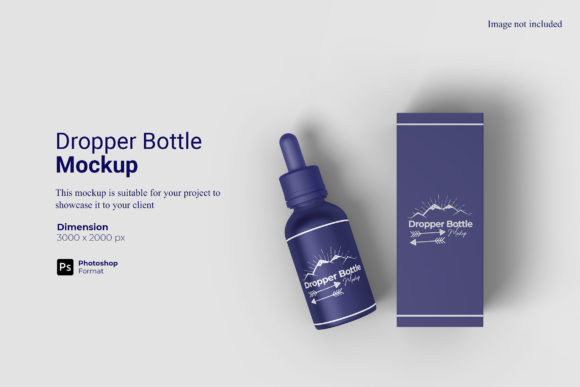
The Dropper Bottle Mockup utilizes advanced rendering techniques to create a lifelike representation of your label and bottle design. When you place your artwork onto the bottle, the software automatically adjusts for curvature, perspective, and lighting inconsistencies. This means your logo doesn’t look like a sticker slapped on top; it looks like it was printed directly onto the glass or plastic surface. For brands selling essential oils, skincare serums, or medicinal tinctures, this level of detail communicates quality and trustworthiness before the customer even touches the product.
Consider the scenario: You are pitching a new brand identity to a boutique skincare company. Showing them a flat layout is informative, but showing them a photorealistic render of their product sitting on a marble countertop, with soft natural light catching the dropper tip, creates an emotional connection. It helps them visualize the final retail experience. That is the power of a high-quality mockup.
Efficiency Through Smart-Object Technology
One of the most frustrating aspects of traditional design presentations is the manual effort required to update visuals. If a client wants to change the color scheme or swap out the typography, designers often had to recreate entire scenes. The Dropper Bottle Mockup eliminates this bottleneck through its integration with Smart-Objects in Photoshop.
For those unfamiliar with the term, Smart-Objects are layers in Photoshop that contain image data from raster or vector images. They preserve an image’s source content with all its original characteristics, enabling nondestructive editing. In the context of this mockup, this feature translates to incredible speed and flexibility.
- Instant Updates: Double-click the smart-object layer, paste your new design, save, and watch the mockup update instantly. No masking, no warping, no complex transformations.
- Non-Destructive Workflow: Because the changes happen within the smart-object container, your original mockup template remains intact. You can revert changes or try multiple variations without losing progress.
- Batch Processing Potential: Once you master the smart-object workflow, you can apply this technique to create multiple versions of the same design (e.g., different sizes or colors) efficiently.
This ease of use is particularly valuable for agencies managing multiple clients or designers who frequently iterate on concepts. What used to take hours of manual manipulation now takes seconds, allowing you to focus more on the creative strategy and less on technical execution.
Technical Specifications and Professional Standards
When selecting a mockup resource, technical specifications matter just as much as aesthetic appeal. The Dropper Bottle Mockup is built to meet the rigorous demands of professional print and digital media. Understanding these specs ensures that your final output is crisp, clear, and ready for any platform.
Resolution and Clarity
The mockup comes in a resolution of 300 dpi. This is the gold standard for print materials. Whether you are preparing files for a physical brochure, a trade show banner, or a high-resolution website hero image, 300 dpi ensures that text remains legible and edges remain sharp. Low-resolution mockups can appear pixelated or blurry, which subconsciously signals low quality to the viewer. By starting with a high-dpi asset, you maintain the integrity of your brand’s visual identity.
Dimensions and Aspect Ratio
With a size of 3000x2000 pixels, this mockup provides ample canvas space for detailed compositions. This aspect ratio is versatile enough for both landscape-oriented web layouts and square formats used on social media platforms like Instagram and Pinterest. The generous dimensions also allow you to crop the image differently for various marketing channels without sacrificing quality. For instance, you might use the full width for a website header and zoom in on the bottle label for a close-up product shot on a mobile app.
Format Compatibility
Delivered in PSD (Photoshop Document) format, the mockup is compatible with Adobe Photoshop CC and later versions. This widespread compatibility ensures that most design professionals can open and edit the file without needing specialized software. Additionally, the inclusion of a PDF help guide makes the onboarding process seamless. Even if you are less experienced with Photoshop’s layer management, the guide walks you through the steps to replace designs, adjust backgrounds, and export your final work.
Versatility in Presentation and Marketing
A key feature of this mockup is the ability to change the background color. This seemingly simple function opens up a world of marketing possibilities. Different backgrounds evoke different emotions and suit different brand personalities.
Imagine presenting a luxury anti-aging serum. A dark, moody background with subtle shadows can convey sophistication and exclusivity. Now, imagine the same product positioned against a bright, airy white or pastel background. The mood shifts entirely to cleanliness, purity, and freshness. By having the flexibility to alter the background, you can tailor the same product image to fit diverse campaign themes, seasonal promotions, or target demographics.
This adaptability is crucial for social media marketers who need to maintain a cohesive yet varied feed. Instead of shooting dozens of physical photos under different lighting conditions, you can generate multiple variations digitally. This not only saves money but also ensures consistency in lighting and angle across all your posts.
Practical Considerations for Buyers
Before integrating the Dropper Bottle Mockup into your toolkit, it is important to manage expectations regarding the preview images. Typically, stock mockup previews include lifestyle elements—such as plants, towels, or other props—to provide context and inspiration. However, these elements are usually illustrative only. The core value lies in the bottle itself and the smart-object functionality.
Users should be aware that they will likely need to add their own contextual elements if they desire a specific lifestyle setting. While the mockup provides the perfect stage for your product, the "set dressing" is up to the designer. This actually offers a benefit: complete creative control. You are not limited to the props included in the preview; you can build a scene that perfectly aligns with your brand story.
Furthermore, consider your existing workflow. If your team already relies heavily on Photoshop, this mockup will integrate effortlessly. If you use other tools like Affinity Photo or GIMP, compatibility may vary, so checking version requirements is advisable. However, for the vast majority of design professionals working in the Adobe ecosystem, this is a plug-and-play asset.
Why Invest in High-Quality Mockups?
In an era where digital presence defines business success, the quality of your visual assets directly impacts conversion rates. A sloppy presentation can undermine an otherwise excellent product. Conversely, a polished, professional display builds credibility.
The Dropper Bottle Mockup is an investment in your professional image. It allows you to:
- Reduce Production Costs: Skip the cost of manufacturing physical samples for every design iteration.
- Accelerate Time-to-Market: Get feedback from clients faster by providing realistic visuals early in the process.
- Enhance Brand Perception: Communicate attention to detail and premium quality through photorealistic renders.
- Streamline Collaboration: Make it easy for non-designers to understand and approve concepts by showing them exactly what the product will look like.
Ultimately, the goal of any designer is to communicate ideas effectively. Tools like the Dropper Bottle Mockup remove technical barriers, allowing creativity to flow freely. By offering a realistic 3D display, easy-to-use smart-object features, and professional-grade specifications, this asset empowers you to showcase your designs with confidence. Whether you are designing for a small local apothecary or a global cosmetics giant, the ability to present your work professionally is a skill that pays dividends. Embrace the efficiency and realism that this mockup provides, and watch your design presentations reach new heights.