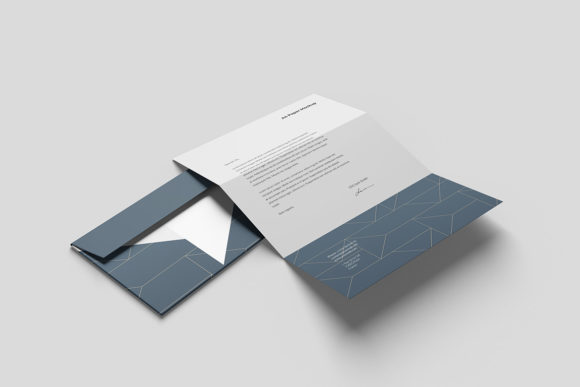
Styled Envelope and White Card Mockup: Streamlining Your Presentation Workflow
In the competitive landscape of branding, marketing, and design, the final presentation is often as critical as the creative work itself. Whether you are a freelance graphic designer pitching a rebrand to a client, a small business owner preparing packaging for an e-commerce launch, or a marketer showcasing social media assets, the context in which your design is viewed dictates its perceived value. This is where the Styled Envelope and White Card Mockup becomes an indispensable asset in your digital toolkit. It is not merely a visual prop; it is a strategic tool that bridges the gap between abstract digital files and tangible, real-world applications.
The modern workflow demands efficiency without sacrificing quality. Designers spend hours perfecting typography, color palettes, and layout structures, only to present them on flat screens that fail to convey depth, texture, or scale. By integrating high-fidelity mockups into your process, you provide stakeholders with a realistic preview of the final product. The specific combination of a styled kraft envelope and a crisp white card offers a versatile aesthetic that appeals to a broad audience, from luxury brands seeking minimalism to eco-conscious businesses aiming for organic authenticity.
Understanding the Asset and Its Technical Foundation
At its core, the Styled Envelope and White Card Mockup is a sophisticated Photoshop file designed to simplify the visualization process. Unlike complex 3D renders that require extensive rendering time and powerful hardware, this mockup utilizes advanced layer structures to deliver photorealistic results instantly. The file is provided in .psd format, ensuring compatibility with Adobe Photoshop, the industry standard for image editing. With a resolution of 6016×4016 pixels and a density of 300 DPI, the asset is print-ready and sufficiently large to accommodate detailed scrutiny by clients or internal review teams.
The true power of this mockup lies in its use of smart objects. A smart object is a container within Photoshop that allows you to insert your design while preserving the original qualities of the source data. This means you can resize, filter, or transform your design multiple times without losing quality. For professionals managing tight deadlines, this non-destructive workflow is crucial. You do not need to manually align your design onto the curved surfaces of the envelope or the flat plane of the card. Instead, you simply paste your design into the designated smart object layer, save the changes, and the mockup automatically applies perspective, lighting, and shadows to match the scene.
Integrating Safety Zones for Precision Placement
One of the most common challenges in using mockups is ensuring that text and logos remain within safe boundaries, avoiding areas that might be obscured by folds, shadows, or the physical structure of the envelope. To address this, the Styled Envelope and White Card Mockup includes a dedicated Safety Zone feature. This is a practical implementation detail that significantly reduces the risk of design errors during the presentation phase.
The safety zone consists of guide lines embedded within the smart object layer. These lines indicate the area where your design will appear clearly, excluding regions that are folded over or hidden behind the card flap. When working with the file, you can activate these layers to visualize the constraints before finalizing your artwork. This feature is particularly useful for designers who struggle with manual alignment or those who want to ensure consistency across multiple variations of a brand identity. By adhering to the safety zone, you guarantee that every element of your design—from the main logo to fine print details—is visible and impactful in the final presentation.
To utilize this feature effectively, follow a simple protocol: first, open the PSD file and locate the smart object layer. Second, enable the visibility of the safety zone guides. Third, place your design within the indicated boundaries. Finally, save the smart object to update the mockup. This process takes seconds but saves hours of potential revision cycles caused by misaligned elements.
Strategic Use Cases Across Professional Workflows
The versatility of the Styled Envelope and White Card Mockup allows it to fit seamlessly into various stages of professional workflows. Understanding when and how to use this asset can enhance communication with clients and streamline internal approvals.
Pre-Production Planning and Concept Development
During the early stages of a project, designers often create multiple concepts to explore different directions. Using the mockup at this stage allows for rapid prototyping. Instead of waiting for physical proofs, which are costly and time-consuming, you can generate dozens of variations digitally. This accelerates the feedback loop, enabling clients to choose a direction based on how the design looks in context rather than just in isolation. The contrast between the warm, textured kraft paper and the clean white card provides a neutral backdrop that lets the design speak for itself, making it easier to evaluate color accuracy and typographic hierarchy.
Client Presentations and Pitch Decks
When presenting to clients, context is king. A flat JPEG of a logo feels incomplete compared to a lifestyle image showing that logo embossed on a premium card inside a stylish envelope. The Styled Envelope and White Card Mockup elevates the perceived value of your work. It signals professionalism and attention to detail. For marketers and agency owners, this tool is essential for closing deals. It helps clients visualize the end result, reducing uncertainty and building confidence in the proposed solution. The photorealistic nature of the mockup—being a photo-based asset rather than a vector or 3D render—adds a layer of authenticity that resonates with decision-makers.
E-Commerce and Product Launches
For small business owners and entrepreneurs, unboxing experiences are a critical part of customer retention. The envelope and card set represents the first physical touchpoint a customer has with a brand after purchasing online. By using this mockup in product listings, promotional materials, or social media campaigns, businesses can showcase their packaging strategy. This is particularly effective for brands selling stationery, jewelry, cosmetics, or artisanal goods. The ability to display custom designs on the envelope and card helps customers imagine receiving the product, thereby increasing conversion rates.
Brand Consistency and Style Guides
Maintaining brand consistency across all touchpoints is a ongoing challenge. The mockup serves as a reference point in brand guidelines, illustrating how logo variations, color codes, and typography should interact with physical materials. Educators and freelancers teaching branding principles can use this asset to demonstrate best practices in print design. It provides a concrete example of how digital assets translate to physical media, reinforcing the importance of bleed areas, safe zones, and material selection.
Practical Implementation Tips for Efficiency
To get the most out of the Styled Envelope and White Card Mockup, consider the following practical tips that align with efficient workflow management:
- Prepare Assets Correctly: Ensure your designs are exported in high-resolution formats (PNG or TIFF) before placing them into the smart object. This prevents pixelation when zooming in for detailed presentations.
- Leverage Layer Groups: Organize your design layers within the smart object logically. Even though the mockup handles the placement, keeping your internal file tidy makes future edits faster and less prone to error.
- Understand Limitations: Remember that this is a static photo-based mockup. The background color and lighting do not change dynamically. If you need to test your design against different background colors, you may need to composite the mockup into a new scene or use additional editing techniques.
- Typography Exclusion: Be aware that any pre-existing typography on the mockup is not included in your editable area. Focus your design efforts on the elements intended for the envelope and card, such as logos, patterns, or contact information.
- Regular Updates: As your brand evolves, regularly update the mockup files with new designs. Keeping a library of updated mockups ensures that your portfolio and sales materials always reflect the current state of your brand.
Long-Term Value and Quality Control
Investing in high-quality mockups like the Styled Envelope and White Card Mockup is a long-term strategy for maintaining professional standards. The inclusion of documentation and clear instructions within the file reduces the learning curve, allowing users of all skill levels to produce professional results. For agencies managing multiple projects, having a standardized set of mockups ensures consistency across different designers and teams. This uniformity enhances brand cohesion and simplifies the review process.
Furthermore, the 300 DPI resolution ensures that the mockup remains sharp even when printed for physical portfolios or large-format displays. This attention to technical detail reflects positively on the user, demonstrating a commitment to quality. In an era where digital presence and physical experience are increasingly intertwined, tools that bridge this gap are invaluable. By integrating the Styled Envelope and White Card Mockup into your routine, you not only save time but also elevate the impact of your creative work, leading to better client satisfaction and more successful project outcomes.
Ultimately, the goal of any designer or creator is to communicate their vision effectively. This mockup removes the friction between concept and reality, allowing you to focus on what matters most: creating compelling designs. Whether you are refining a personal brand, launching a startup, or delivering a corporate campaign, the right tools make the difference between good work and exceptional presentation. Embrace the efficiency and clarity that the Styled Envelope and White Card Mockup offers, and watch your workflow transform.