Evaluating the Four Envelopes Mockup with Macarons for Brand Presentation
In the competitive landscape of brand identity and packaging design, the visual presentation of a concept is often as critical as the design itself. Designers and marketing professionals frequently seek tools that bridge the gap between abstract ideas and tangible reality. Among the various resources available for this purpose, the Four Envelopes Mockup with Macarons has emerged as a specialized asset for those looking to showcase stationery, luxury goods, or delicate product lines. This article provides a detailed evaluation of this specific mockup, analyzing its technical specifications, usability features, and suitability for different professional scenarios.
Understanding the Core Concept
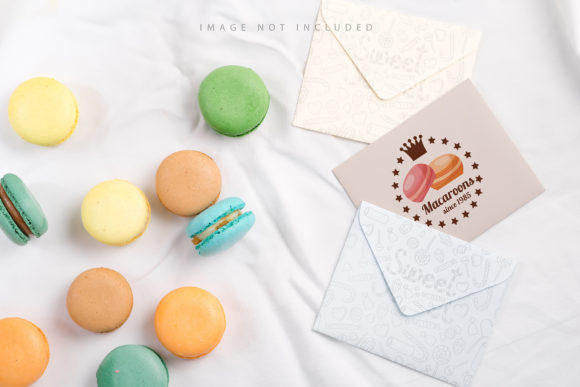
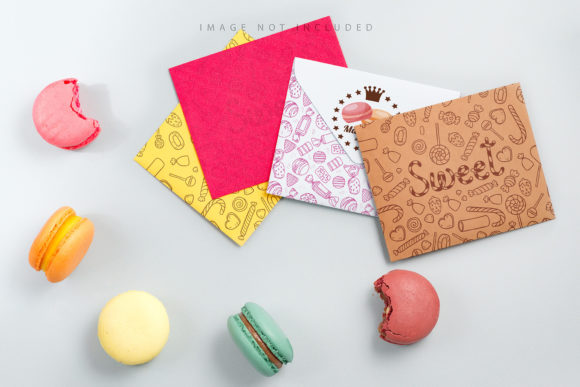
The Four Envelopes Mockup with Macarons is a high-fidelity visual representation designed to display envelope designs in a realistic setting. Unlike generic flat lay templates, this mockup incorporates a curated aesthetic featuring macarons against a neutral grey background. This combination serves a specific psychological and visual function: it evokes feelings of elegance, sweetness, and premium quality. For brands dealing with confectionery, wedding invitations, boutique retail, or artistic prints, this context provides an immediate emotional connection before the viewer even reads the text on the envelope.
What makes this resource distinct is its balance between artistic composition and functional utility. It is not merely a static image but a structured file intended for active use by graphic designers. The inclusion of four envelopes allows for the display of multiple color variations or design iterations simultaneously, offering a comprehensive view of a brand’s palette without requiring complex compositing skills from the user.
Technical Specifications and Workflow Efficiency
For professionals evaluating design assets, technical precision is paramount. The Four Envelopes Mockup with Macarons is delivered in a .psd format at a resolution of 6016×4016 pixels. This high pixel count ensures that the output remains crisp and sharp, even when printed in large formats or displayed on high-resolution digital screens. At 300 DPI, the file meets industry standards for print-ready materials, ensuring that fine details in typography and imagery are preserved accurately.
A significant advantage of this mockup lies in its implementation of smart objects. The workflow is streamlined through the use of "smart layer" objects. Users can simply paste their design into a designated smart object layer and save the file. The software automatically maps the design onto the envelope surfaces, adjusting for perspective and lighting. This process eliminates the need for manual warping, mesh distortions, or blending mode adjustments, which can be time-consuming and prone to error. By reducing the technical barrier to entry, designers can focus more on the creative aspects of their project rather than the mechanics of the mockup itself.
The Role of the Safety Zone
One of the most practical features included in this asset is the safety zone. In professional design, placing content too close to the edges of an object can result in clipping or awkward cropping during printing or viewing. The Four Envelopes Mockup with Macarons includes defined safety zones within the smart object layers. These zones are marked by guide lines that indicate where content should remain to ensure full visibility. When activating the relevant layer, users can see these boundaries clearly, preventing common mistakes such as cutting off logos or important typographic elements. This feature is particularly valuable for teams working collaboratively, as it provides clear visual instructions for junior designers or non-specialist staff who may be handling the final file assembly.
Comparative Analysis: Realistic Photography vs. 3D Renders
When selecting mockups, designers often choose between photorealistic images (like this one) and 3D rendered models. Understanding the tradeoffs between these approaches helps in making an informed decision. The Four Envelopes Mockup with Macarons is explicitly noted as a photo-based asset, not a 3D or vector model. This distinction carries several implications for the end-user.
- Lighting and Texture: Because it is based on photography, the mockup captures natural light interactions, shadows, and material textures inherent to real-world paper and food items. This lends an authenticity that can sometimes be difficult to achieve with 3D rendering, especially regarding the subtle translucency of paper or the porous texture of macarons.
- Flexibility of Background: A limitation of photo-based mockups compared to fully editable 3D scenes is the fixed nature of the environment. The background or design color does not change dynamically. If a designer requires the same envelope design on a white marble surface instead of a grey backdrop, they would need a different asset. However, the neutral grey background chosen here is versatile enough to complement most color palettes without clashing.
- Processing Power: Working with high-resolution photographic PSDs can be more demanding on computer memory than lightweight vector files. However, the resulting visual fidelity often justifies the slight increase in system load, particularly for final presentations.
Ideal Use Cases and Target Audiences
Determining whether the Four Envelopes Mockup with Macarons is the right choice depends largely on the nature of the project. Its strengths lie in sectors where aesthetics and sensory appeal are primary selling points.
Wedding and Event Stationery: Wedding invitations often utilize soft colors, elegant fonts, and romantic motifs. The presence of macarons reinforces themes of celebration, luxury, and attention to detail. Presenting invitation suites using this mockup helps couples visualize how their chosen stationery will look in a real-life setting, enhancing the sales pitch for stationery designers.
Food and Beverage Packaging: For artisanal bakeries, chocolate shops, or gourmet gift companies, this mockup provides a direct link between the product and its packaging. Showing a cookie cutter design or a logo on an envelope alongside the actual product (represented by the macarons) creates a cohesive brand story. It suggests that the care put into the packaging matches the care put into the food inside.
Lifestyle and Boutique Retail: Brands selling cosmetics, jewelry, or small gifts often use envelopes for thank-you notes or shipping. This mockup elevates the perceived value of these small touches, suggesting that the entire unboxing experience is curated and premium.
Limitations and Considerations
While the Four Envelopes Mockup with Macarons offers many advantages, it is important to acknowledge its limitations to ensure it fits your specific needs.
First, the typography applied in the preview images is not included. Users must bring their own text elements. While this allows for complete customization, it requires the designer to have basic typographic skills to ensure the text looks natural within the scene. Second, because the background is fixed, the mockup lacks the versatility of modular systems where every element can be swapped. If a client requests a stark black background or a vibrant tropical setting, this particular asset would not suffice without extensive post-production editing, which could compromise the realism.
Additionally, the reliance on smart objects means that users must be comfortable navigating Adobe Photoshop’s layer management system. While the safety zones simplify placement, understanding how to duplicate smart objects and manage layer groups is still necessary for efficient workflow. For beginners, there may be a slight learning curve, although the documentation provided typically mitigates this issue.
Decision Factors for Buyers
When comparing this option to other mockup resources, consider the following factors:
- Brand Alignment: Does your brand voice align with the elegant, sweet aesthetic of the macarons? If your brand is industrial, tech-focused, or minimalist, this mockup might feel incongruous.
- Output Requirements: Do you need print-ready files at 300 DPI? If so, this asset meets that criterion. If you only need low-res web previews, a simpler, lighter file might be more appropriate.
- Customization Needs: Are you satisfied with a grey background, or do you require full environmental control? If flexibility in the background is crucial, you might look toward 3D-rendered mockups instead.
- Team Expertise: Is your team proficient with Photoshop smart objects? The efficiency gains from this mockup are maximized when users are familiar with the toolset.
Conclusion
The Four Envelopes Mockup with Macarons stands out as a specialized, high-quality tool for designers seeking to present stationery and packaging in a sophisticated, appetizing context. Its combination of high-resolution photography, user-friendly smart object workflows, and thoughtful safety zones makes it a robust choice for professional presentations. While it may not suit every brand aesthetic due to its fixed background and specific thematic elements, it excels in industries where romance, luxury, and culinary arts intersect. For those aligned with these values, it offers a reliable and visually compelling way to bring design concepts to life.