A5 Trifold Mockup: The Realistic Way to Present Your Designs
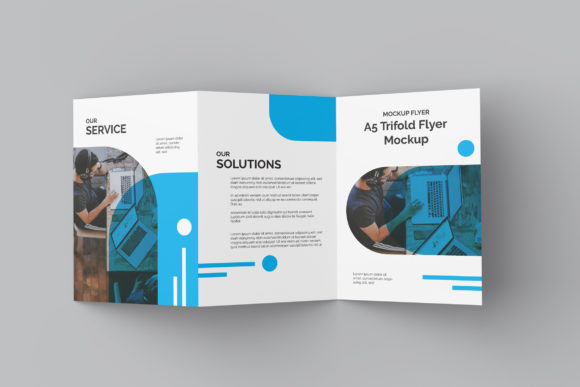
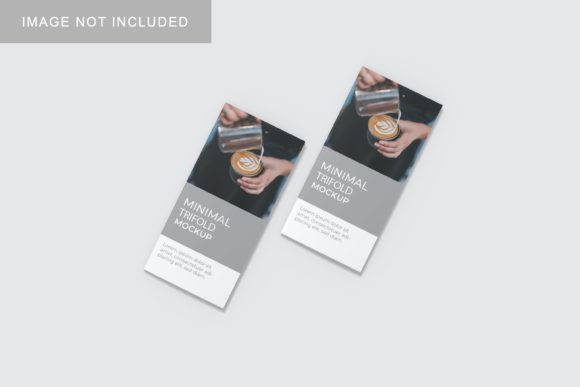
You have spent hours refining a brochure, polishing the typography, and selecting the perfect color palette. The design is ready, but how you present it matters just as much as the work itself. Sending a flat JPEG of a digital file often fails to convey texture, scale, or context. This is where an A5 Trifold Mockup becomes an indispensable tool in your creative workflow. It transforms a static image into a tangible, realistic 3D display that helps clients, employers, or customers visualize the final product before it is ever printed.
This resource is designed for professionals who need to showcase their designs efficiently without investing time in complex 3D rendering software. By using a PSD Photoshop format equipped with smart-object features, you can replace the current placeholder designs with your own artwork within seconds. The result is a high-quality presentation that looks authentic, professional, and ready for print.
Why Presentation Matters in Design
In a competitive market, first impressions are everything. Whether you are pitching a rebranding strategy to a small business owner or submitting a portfolio piece for a freelance job, the way your work is displayed influences perception. A trifold brochure is one of the most common marketing materials used by businesses ranging from local cafes to tech startups. However, seeing a flat layout on a screen does not give the client a sense of the physical object’s weight, fold lines, or paper quality.
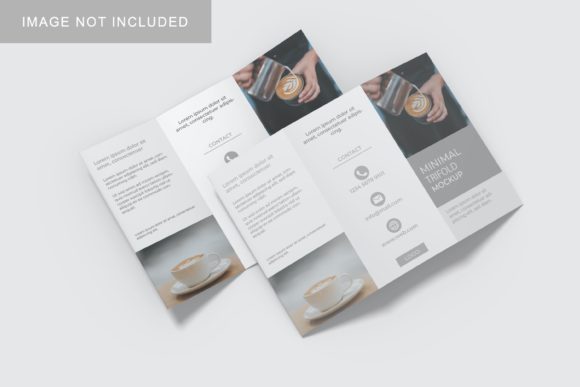
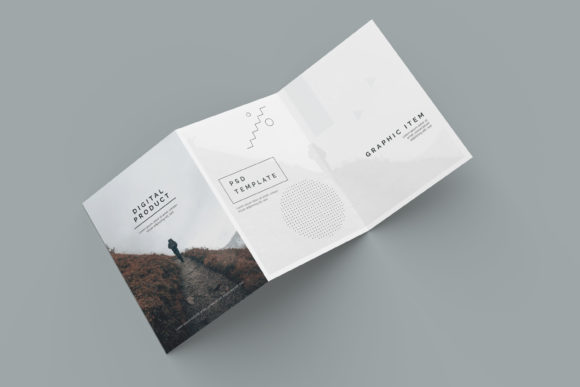
An A5 trifold mockup bridges this gap. It provides a realistic 3D view that mimics how the brochure will look when held in someone’s hands. This visual clarity reduces ambiguity and builds trust. When a client sees a photorealistic representation of their design, they can better evaluate spacing, font readability, and overall aesthetic appeal. This leads to faster approvals and fewer revision rounds, saving everyone time and frustration.
Who Can Benefit from This Tool?
The versatility of an A5 trifold mockup makes it suitable for a wide range of users. It is not limited to graphic designers alone. Here is how different professionals can leverage this resource in their daily work.
Freelancers and Agency Designers
If you work independently or manage a small agency, your portfolio is your sales pitch. High-quality mockups elevate your presentations, making your work stand out against competitors who might use basic templates. You can quickly generate multiple variations of a brochure design to show clients different style options. Instead of manually creating scenes in Photoshop, which can take hours, you can swap out designs using smart objects in minutes.
Entrepreneurs and Small Business Owners
Many small business owners wear multiple hats, including marketing and branding. If you are launching a new service or product, you likely need promotional materials. Using a mockup allows you to create compelling visuals for social media ads, websites, or investor decks without hiring a designer for every single iteration. You can test different headlines or images to see which version looks more appealing in a realistic setting.
Educators and Students
In academic settings, students often need to submit projects that include printed materials. An A5 trifold mockup provides a clean, professional backdrop for showcasing school projects, research summaries, or event flyers. Educators can also use these mockups to demonstrate proper layout techniques and print readiness to their classes, illustrating the importance of margins, bleed, and fold lines.
Bloggers and Content Creators
Content creators frequently produce downloadable resources like e-books, checklists, or guides. Even if the final product is digital, presenting it as a physical booklet can increase its perceived value. A mockup makes a PDF guide look like a premium ebook, encouraging downloads and engagement. It adds a layer of professionalism that resonates with audiences looking for high-quality information.
Key Features That Drive Efficiency
The effectiveness of this tool lies in its technical specifications, which are tailored for ease of use and high output quality. Understanding these features helps you maximize the potential of the mockup.
- Smart-Object Compatibility: The core advantage is the use of smart objects in Photoshop. This means you do not need advanced editing skills. Simply double-click the smart object layer, paste your design, save, and close. The mockup automatically adjusts to fit the curves and folds of the brochure. This feature drastically reduces the learning curve and speeds up your workflow.
- High Resolution (300 DPI): At 3000x2000 pixels, the mockup is optimized for both web and print. This resolution ensures that your designs remain crisp and clear whether viewed on a smartphone screen or projected on a large monitor. There is no pixelation, maintaining the professional integrity of your work.
- Changeable Backgrounds: Context matters. Depending on your brand identity, you might want your brochure displayed on a clean white desk, a rustic wooden table, or a modern office space. The ability to change the background color or texture allows you to tailor the presentation to match specific moods or environments. This flexibility helps in creating cohesive visual stories for different marketing campaigns.
- PDF Help Guide: For those who are less familiar with Photoshop, a comprehensive PDF guide is included. This step-by-step manual walks you through the process of inserting your designs, ensuring that even beginners can achieve professional results without needing external support.
Practical Scenarios for Use
To fully appreciate the utility of an A5 trifold mockup, consider some real-world scenarios where it proves invaluable.
Scenario 1: The Client Pitch
You are meeting with a prospective client who runs a local yoga studio. They want a brochure for an upcoming wellness retreat. Instead of showing them a flat list of benefits, you present a mockup of the brochure resting on a yoga mat next to a water bottle. The visual connection between the product and the lifestyle creates an emotional resonance that a flat image cannot achieve. The client immediately imagines themselves holding the brochure at the event.
Scenario 2: Social Media Campaign
A restaurant chain is launching a new menu. They need eye-catching images for Instagram and Facebook. By placing the trifold mockup in various settings—a sunny patio, a cozy booth, or a busy counter—they create a series of engaging posts. These varied backgrounds keep the content fresh and visually interesting, driving higher engagement rates compared to standard food photography alone.
Scenario 3: Portfolio Review
A junior designer is applying for a position at a top creative agency. Their portfolio includes several brochure designs. By using consistent, high-quality mockups across all projects, the designer presents a unified and polished body of work. This consistency demonstrates attention to detail and professionalism, increasing the chances of landing the interview.
Things to Consider Before Using
While this tool is powerful, there are a few considerations to keep in mind to ensure the best results.
Design Adaptability: Not all designs translate perfectly to a trifold format. Ensure your layout accounts for the folds. Text and critical images should not be placed too close to the edges where they might get cut off or obscured by the fold lines. Always preview your design within the mockup to check for any awkward distortions or spacing issues.
Image Quality: Since the mockup is high-resolution (300 DPI), low-quality input images will appear blurry. Make sure your source files are sharp and properly sized before importing them into the smart objects. Blurry text or pixelated graphics will detract from the realism of the mockup.
Realism vs. Illustration: Remember that the photos used in the preview are for illustration purposes only. While the mockup provides a realistic base, lighting and shadows are pre-set. If you need specific lighting conditions, you may need to adjust the lighting layers in Photoshop. However, for most general purposes, the default lighting is sufficient to convey a professional look.
File Format Limitations: This resource is available in PSD Photoshop format. If you do not have access to Adobe Photoshop, you will not be able to utilize the smart-object features. Ensure you have the necessary software before purchasing or downloading the item. Alternative formats like AI or Sketch are not included, so compatibility is key.
Conclusion
An A5 trifold mockup is more than just a template; it is a strategic asset for anyone involved in design and marketing. It simplifies the presentation process, enhances the perceived value of your work, and helps communicate ideas more effectively. By leveraging its user-friendly features, such as smart objects and high-resolution outputs, you can create stunning visual presentations that resonate with your audience. Whether you are a seasoned designer or a business owner managing your own branding, incorporating realistic mockups into your workflow is a practical step toward achieving professional excellence.