Christmas Craft Gift Box Mockups
The holiday season brings a unique set of challenges for designers, small business owners, and creative professionals. The demand for festive packaging is at its peak, yet the pressure to produce high-quality, visually appealing presentations quickly is intense. This is where specialized digital assets become invaluable. Specifically, the Christmas Craft Gift Box mockup offers a streamlined solution for visualizing designs in a realistic, seasonal context without the need for physical prototyping.
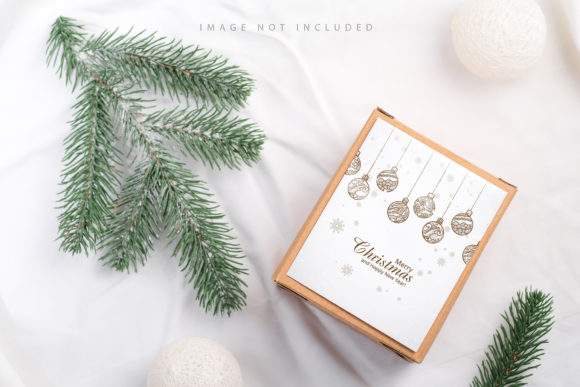
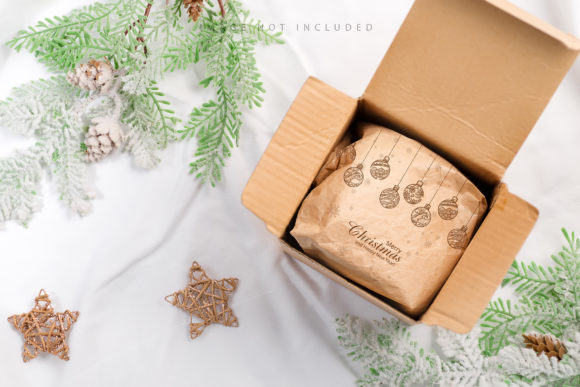
This particular resource focuses on a flat lay composition featuring thuja branches and craft gift boxes on textile backgrounds. It is designed to simplify the workflow for anyone needing to showcase their artwork, typography, or branding during the Christmas period. By understanding how this tool works and who it serves, you can determine if it fits your specific project needs.
Understanding the Design: Flat Lay and Seasonal Elements
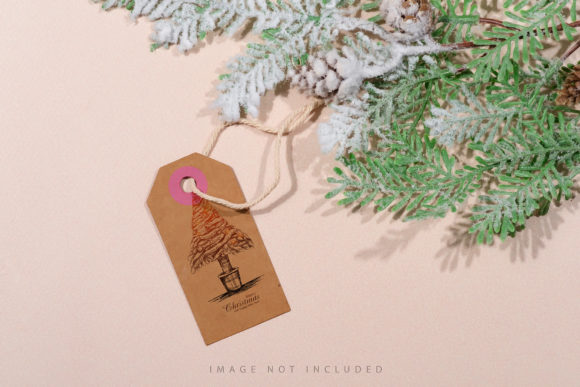
At its core, this mockup is a high-resolution PSD file sized at 6016×4016 pixels with a resolution of 300 DPI. This ensures that whether you are printing marketing materials or displaying work on a retina screen, the image remains crisp and professional. The aesthetic is grounded in natural textures, utilizing thuja branches—often used in winter arrangements—and rustic craft gift boxes placed on soft textile surfaces.
The "flat lay" style is a popular photography technique where objects are arranged directly above the camera, creating a two-dimensional look that is easy to read and aesthetically pleasing. For designers, this perspective allows the viewer to focus entirely on the product or design being showcased, free from distracting angles or shadows that might obscure details. The inclusion of thuja adds an organic, festive touch that immediately signals "Christmas" without being overly cliché, making it suitable for a wide range of brands, from artisanal soap makers to boutique stationery shops.
How Smart Objects Simplify the Workflow
One of the most significant features of this asset is its use of smart objects. In Adobe Photoshop, a smart object is a container that holds raster or vector image data from a source file. This means you can place your design into the box, wrap it around the curves, and adjust the lighting and shadows automatically. You do not need to manually mask, warp, or blend your graphics.
The process is straightforward:
- Paste Your Design: Open the PSD file and locate the designated layer.
- Use the Smart Layer Object: Simply paste your design into the smart object area.
- Save and Update: Once saved, the main document updates automatically to reflect your new design within the context of the Christmas craft box.
This feature drastically reduces the time spent on technical adjustments, allowing you to focus on creativity rather than software mechanics. It is particularly beneficial for those who may not be advanced Photoshop users but still require professional results.
The Importance of Safety Zones
A critical detail often overlooked in mockups is the "safety zone." In this file, there are specific lines indicating areas that should not contain important design elements like text or logos. These zones account for folds, shadows, and the curvature of the gift box.
Why does this matter? If you place a crucial logo in a shadowed fold or near the edge where the box wraps around, it may become illegible or distorted in the final presentation. The safety zone acts as a guide, ensuring that your most important information remains clear and visible. To see these guidelines, you simply activate the specific layer provided in the file structure. This small feature demonstrates a high level of attention to detail from the creator, helping you avoid common presentation mistakes.
Who Benefits from This Resource?
The utility of a Christmas Craft Gift Box mockup extends across various professional and personal domains. Here is how different groups might evaluate its value:
Small Business Owners and Entrepreneurs
If you sell handmade goods, such as candles, ornaments, or baked treats, packaging is part of your brand identity. This mockup allows you to create consistent, attractive social media posts and product listings without hiring a photographer. The ability to quickly swap out designs means you can test different color schemes or messages to see what resonates with your customers.
Graphic Designers and Freelancers
For freelancers, speed is money. When a client requests a quick turnaround on holiday branding, having a reliable mockup saves hours of manual editing. The active smart object feature ensures that even if you are working under tight deadlines, the output looks polished. Furthermore, the non-3D nature of the file (it is a photo-based PSD) ensures realism that sometimes complex 3D renders lack, providing a trustworthy representation of the final product.
Beginners and Hobbyists
For those just starting their design journey, complex workflows can be daunting. This mockup lowers the barrier to entry. You do not need to understand advanced masking techniques or layer styles. By simply pasting your design, you achieve a professional result. This encourages experimentation and helps beginners build a portfolio with minimal frustration.
Educators and Content Creators
Blogs and educational platforms often need visuals to illustrate articles about DIY crafts or holiday tips. Using a clean, thematic mockup enhances the visual appeal of written content. The flat lay style is particularly effective for online reading, as it provides a clear, uncluttered view that complements instructional text.
Priorities in Selection: Quality vs. Flexibility
When choosing a mockup, several factors come into play. Cost is a consideration, but investing in a high-quality, well-documented PSD can save time in the long run. The 300 DPI resolution ensures print readiness, which is essential for businesses that need physical proofs. Additionally, the fact that the background or design color does not change unintentionally provides stability; you control the palette, and the mockup respects your choices.
However, it is important to note limitations. Typography applied to the mockup is not included, meaning you must add your own text. This is actually a benefit for flexibility, as it allows you to customize every aspect of the message. Also, since this is a photo-based mockup and not a 3D model, you cannot rotate the camera angle. The fixed flat lay perspective is intentional, offering consistency across multiple designs.
Final Considerations
The Christmas Craft Gift Box mockup is more than just a template; it is a tool that bridges the gap between creative vision and professional presentation. By leveraging smart objects and safety zones, it empowers users of all skill levels to produce high-quality visuals efficiently.
Whether you are a seasoned marketer preparing a holiday campaign, a hobbyist documenting your crafting projects, or a student learning the ropes of design, this resource offers practical value. It emphasizes ease of use, reliability, and aesthetic appeal, making it a worthy addition to your digital toolkit. As you prepare for the busy season, consider how simplifying your workflow can allow you to focus more on the quality of your creations and less on the technicalities of presentation.
Remember, the goal is not just to display a product, but to tell a story. The combination of thuja branches, craft textures, and clean design principles in this mockup provides the perfect backdrop for that narrative. Take advantage of the documentation included, respect the safety zones, and let your designs shine through with clarity and confidence.