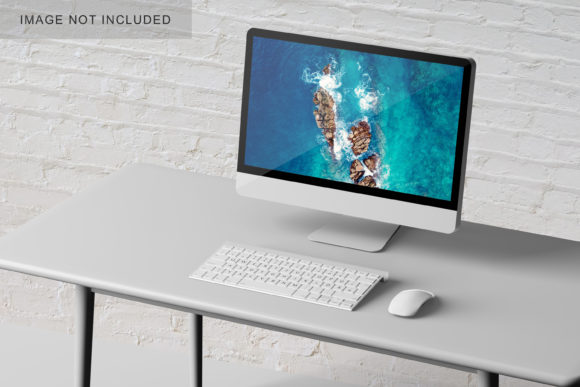
Computer Mockup V4: Elevating Your Design Portfolio with Realistic 3D Displays
In the competitive world of digital design, how you present your work is just as critical as the work itself. A flat screenshot of a website or an app interface often fails to convey the depth, texture, and context that potential clients or employers need to truly appreciate the effort behind the pixels. This is where Computer Mockup V4 steps in, offering a bridge between raw creative output and professional presentation. Designed specifically for those who need to showcase their designs in a realistic 3D display, this tool transforms ordinary screens into compelling visual narratives.
The core value of Computer Mockup V4 lies not just in its aesthetic appeal, but in its efficiency. For designers juggling multiple projects, spending hours manually creating perspective angles and lighting effects is a luxury few can afford. This mockup leverages smart-object features within Photoshop, allowing you to replace the current designs with your own within seconds. It is available in PSD format, ensuring compatibility with industry-standard workflows, and comes with a size of 3000x2000 pixels at 300 dpi—resolution high enough for both web portfolios and high-quality print materials.
Why Context Matters in Digital Presentation
Consider the difference between sending a client a JPEG of a landing page versus showing them that same page rendered on a sleek, modern monitor sitting on a clean desk. The latter provides context. It suggests that the design is part of a tangible product, ready for user interaction. Computer Mockup V4 capitalizes on this psychological aspect of design presentation. By placing your UI/UX designs, branding elements, or graphic compositions onto a realistic computer screen, you help stakeholders visualize the final product more accurately.
This is particularly useful for freelance graphic designers pitching to corporate clients. When presenting a rebranding package, showing logos and color palettes on a computer screen alongside other brand assets creates a cohesive story. It moves the conversation from abstract concepts to concrete applications. Similarly, for web developers showcasing responsive designs, displaying the layout on a desktop monitor helps non-technical stakeholders understand the spatial hierarchy and navigation flow without needing to look over their shoulders at a browser window.
Real-World Applications Across Industries
The versatility of Computer Mockup V4 extends far beyond simple portfolio pieces. Different industries leverage this tool in unique ways to communicate their value proposition effectively.
UI/UX Designers and Product Teams
For user experience professionals, the ability to quickly iterate on visual presentations is key. During client meetings, time is often limited. With the smart-object feature, a designer can swap out a dashboard wireframe for a polished high-fidelity prototype in moments. This agility allows for dynamic discussions about design choices rather than getting bogged down in technical setup. Furthermore, the changeable background-color feature means you can match the mockup’s environment to your brand identity or the specific mood of the project, whether it’s a stark, minimalist tech vibe or a warm, inviting lifestyle application.
Marketing and Advertising Agencies
Agencies often need to produce pitch decks that wow decision-makers. Using Computer Mockup V4, marketing teams can create eye-catching social media assets or ad creatives that feature their campaigns "in situ." Imagine a promotional video still showing a brand’s new interface running smoothly on a computer. This adds a layer of authenticity that stock photos simply cannot replicate. The 3000x2000 px resolution ensures that these images remain crisp even when scaled up for large-format digital billboards or printed brochures.
Educational Content Creators
Tutorial creators and online educators frequently use mockups to frame their instructional content. If you are writing a blog post about "Top 10 CSS Tricks," embedding an image of the code or result on a computer screen makes the tutorial feel more immersive. It breaks up text-heavy content and provides a visual anchor for readers. The ease of use with Smart-Objects means that even if you are not a Photoshop expert, you can maintain a consistent, professional look across all your educational materials.
Streamlining the Workflow
One of the most significant hurdles in design production is the transition from creation to presentation. Often, the final step of preparing files for client delivery is overlooked because it feels tedious. Computer Mockup V4 addresses this by integrating seamlessly into the existing Photoshop workflow. The inclusion of a PDF help guide further lowers the barrier to entry, ensuring that users of varying skill levels can navigate the smart-object layers without frustration.
The emphasis on speed is crucial. In an era where feedback loops are rapid, being able to update a mockup in seconds allows for greater responsiveness. You can generate multiple variations of the same design with different backgrounds or slight angle adjustments to see which resonates best with your audience. This experimental approach can lead to better engagement rates on social media and higher conversion rates in portfolio sites.
Practical Considerations Before You Begin
While Computer Mockup V4 offers robust features, it is important to approach its use with a clear understanding of its limitations and requirements. First and foremost, the quality of the output is directly tied to the quality of the input. Since the mockup is designed to be realistic, low-resolution or poorly composed source designs will stand out awkwardly against the high-definition 300 dpi render. Always ensure your original artwork is optimized before dropping it into the smart object.
Additionally, remember that the photos used in the preview images are for illustration purposes only and are not included in the download. This means you have the freedom to customize the environment entirely, but it also places the responsibility of aesthetic cohesion on you. Pay attention to lighting and shadows; while the mockup provides a base, tweaking the brightness and contrast of your inserted design to match the ambient light of the computer screen will result in a much more believable final image.
Another consideration is the file format. As this is a PSD file, you must have Adobe Photoshop installed to utilize the smart-object features. While this is standard for most professionals, it may be a hurdle for beginners using free alternatives like GIMP or Canva. However, for those invested in the Adobe ecosystem, the investment in time to learn the smart-object workflow pays off immensely in terms of long-term efficiency.
Final Thoughts on Professional Polish
Ultimately, Computer Mockup V4 is more than just a template; it is a strategic asset for any creative professional looking to elevate their presentation game. By combining realistic 3D aesthetics with the convenience of smart-object editing, it removes the friction between having great designs and showing them off effectively. Whether you are a seasoned agency director or a budding freelancer, taking the time to present your work in context can make the difference between being noticed and being remembered. Embrace the realism, leverage the speed, and let your designs speak for themselves in the most impactful way possible.