Hang Tag Clothing Mockup
In the competitive fashion industry, visual presentation is often as critical as the product itself. Designers, brand owners, and marketing professionals frequently face the challenge of showcasing their apparel labels and hang tags in a way that feels authentic and tangible. This is where digital tools like the Hang Tag Clothing Mockup become essential assets in the creative workflow. Rather than relying solely on physical prototypes or complex 3D modeling software, this resource offers a streamlined solution for presenting designs with professional realism.
This article provides an objective evaluation of the Hang Tag Clothing Mockup, examining its features, usability, and suitability for various design scenarios. By understanding its capabilities and limitations, you can determine whether it aligns with your specific branding and marketing needs.
Understanding the Tool
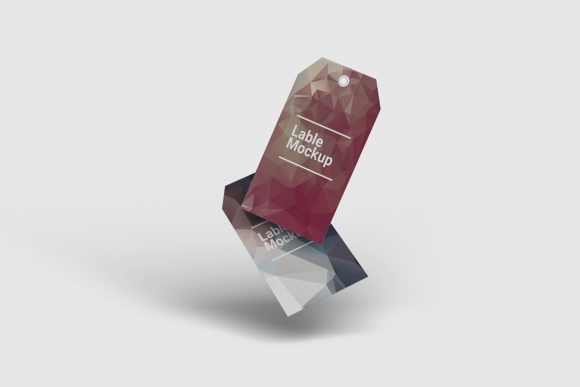
A mockup is a digital representation of a physical product, designed to simulate how a final item will look in real life. The Hang Tag Clothing Mockup specifically targets the small but impactful detail of clothing labels. It allows users to place their custom graphics onto a realistic tag attached to fabric, providing context that flat images cannot convey.
The file is delivered in PSD (Photoshop) format, which is the industry standard for raster graphic editing. A key technical feature of this mockup is its use of smart objects. Smart objects are layers that contain image data from raster or vector images, preserving an image’s source content with all its original characteristics. This means that when you want to update your design, you do not need to manually trace edges or mask out sections. Instead, you simply double-click the designated layer, paste your new design, save, and the mockup updates instantly.
Key Features and Technical Specifications
When evaluating any digital asset, technical specifications play a significant role in determining its utility. The Hang Tag Clothing Mockup comes with several defined attributes that cater to professional workflows:
- High Resolution: The file size is set at 3000x2000 pixels with a resolution of 300 DPI (dots per inch). This high resolution ensures that the output is crisp and suitable for both web display and high-quality print materials. For designers who need to zoom in on texture details or print large-format banners, this specification meets professional standards.
- Smart Object Functionality: As noted, the inclusion of smart objects drastically reduces the time required to swap out designs. This feature is particularly valuable for agencies or freelancers managing multiple clients, as it allows for rapid iteration and comparison of different label concepts.
- Customizable Background: The mockup includes a changeable background color option. This flexibility allows designers to isolate the tag against a neutral backdrop for clean presentations or match the background to a brand’s color palette for cohesive marketing visuals.
- User Support: To assist those who may be less familiar with Photoshop’s advanced features, a PDF help guide is included. This resource serves as a practical onboarding tool, ensuring that users can navigate the smart object process without needing external tutorials.
Benefits of Using This Mockup
The primary advantage of using the Hang Tag Clothing Mockup is efficiency combined with realism. Creating a photorealistic render of a fabric tag from scratch requires advanced skills in lighting, shadow mapping, and texture blending. This mockup democratizes that process, allowing designers with basic Photoshop knowledge to achieve professional results.
Furthermore, it supports a faster feedback loop. In traditional design processes, creating physical samples of every label variation is costly and time-consuming. Digital mockups allow for virtual approvals, reducing waste and accelerating the path to production. For e-commerce businesses, these visuals can be used immediately in online stores, helping customers visualize the quality and style of the garment’s finishing touches.
Considerations and Limitations
While the Hang Tag Clothing Mockup offers significant benefits, it is important to approach it with realistic expectations. It is a static 2D representation based on a single perspective. It does not provide interactive 360-degree views or dynamic animations. If your project requires showing how a tag moves with the fabric during motion, or if you need to see the tag from multiple angles simultaneously, this tool may fall short.
Additionally, the reliance on Adobe Photoshop is a prerequisite. Users without access to this software cannot utilize the file. While Photoshop is widely used, smaller creators or hobbyists might prefer more accessible tools like Canva or GIMP. However, for professional environments, this limitation is rarely an issue.
It is also worth noting that the photos used in preview images are for illustration purposes only and are not included in the download. This is standard practice in the digital asset market, but buyers should understand that they are purchasing the template structure, not the photographic elements themselves.
Situational Fit: When to Use This Asset
The Hang Tag Clothing Mockup is a strong fit for several specific scenarios:
- Brand Identity Development: New fashion brands often need to present their logo and label designs to investors or manufacturing partners. This mockup provides a polished, professional look that elevates the perceived value of the brand.
- E-Commerce Product Listings: Online retailers benefit from detailed imagery. Showing a close-up of a well-designed hang tag adds depth to product pages and can influence purchase decisions by signaling attention to detail.
- Portfolio Presentation: Graphic designers specializing in packaging or textile design can use this mockup to showcase their typography and layout skills in a realistic context, demonstrating how their work interacts with physical materials.
Alternatives to Consider
Depending on your specific needs, other options might be more appropriate. If you require a full-garment view rather than just a close-up of a tag, you might look for full-clothing mockups that include shirts, jackets, or dresses. These provide broader context but may lack the fine detail necessary for label-focused presentations.
For projects requiring animation or interactive displays, WebGL-based 3D viewers or video rendering services would be superior choices, though they typically come with higher costs and longer production times. Additionally, if budget constraints are tight, free open-source mockups available on community forums might suffice, though they often lack the consistent quality, high resolution, and user-friendly smart object structures found in premium assets like this one.
Conclusion
The Hang Tag Clothing Mockup is a practical, efficient tool for designers and marketers focused on presenting clothing labels with professionalism. Its combination of high-resolution output, easy-to-use smart objects, and customizable backgrounds makes it a versatile addition to any design toolkit. While it is limited to static, single-angle presentations and requires Photoshop, these constraints are minor for most professional applications.
For individuals seeking to streamline their workflow, reduce prototyping costs, and enhance the visual appeal of their fashion designs, this mockup represents a sound investment. By carefully assessing your project requirements against the tool’s capabilities, you can confidently decide if it serves your goals effectively. Ultimately, it bridges the gap between digital design files and tangible product reality, offering a clear, compelling way to showcase your creative vision.