IPad Pro Mockup V2
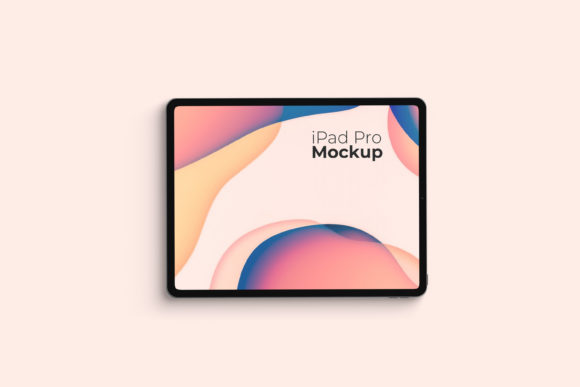
In the competitive landscape of digital design, presentation is often as critical as the creative work itself. Designers, marketers, and developers frequently struggle to convey the scale, context, and realism of their interface designs on flat screens. This is where high-fidelity mockups become an indispensable tool in the workflow. The IPad Pro Mockup V2 addresses this need by offering a realistic 3D display solution that allows professionals to showcase their work with clarity and impact. Rather than simply placing a screenshot on a white background, this asset provides a nuanced environment that mimics real-world usage, helping stakeholders and clients better visualize the final product.
The Purpose and Core Functionality
At its core, the IPad Pro Mockup V2 is designed for efficiency and visual fidelity. It serves as a bridge between raw design files and polished presentations. For freelancers and agency designers alike, the time spent setting up scenes can be significant. This mockup streamlines that process by leveraging Adobe Photoshop’s smart-object technology. Users can replace the current designs with their own creations within seconds, eliminating the need for complex layer masking or manual clipping paths. This functionality is particularly valuable during client reviews or portfolio updates, where speed and accuracy are paramount.
The item is delivered in PSD format, ensuring compatibility with industry-standard software. The inclusion of a PDF help guide further reduces the learning curve, making it accessible even to those who may not be experts in advanced Photoshop techniques. By focusing on ease of use without sacrificing professional quality, the mockup supports a wide range of users, from seasoned graphic designers to educators demonstrating UI/UX principles in a classroom setting.
Technical Specifications and Quality
When evaluating a digital asset for long-term use, technical specifications play a crucial role in determining its versatility. The IPad Pro Mockup V2 features a resolution of 3000x2000 pixels at 300 DPI. This high-resolution output ensures that the mockup remains crisp and clear when printed for physical portfolios or displayed on high-density monitors. The aspect ratio and dimensions are optimized for modern tablet displays, providing a balanced canvas that highlights both vertical and horizontal layouts effectively.
One of the standout features is the changeable background color. In design presentations, context matters. A stark white background might feel clinical, while a dark theme could obscure certain UI elements. The ability to adjust the background color allows designers to tailor the presentation to match brand guidelines or to create contrast that draws attention to specific design features. This flexibility enhances the overall effectiveness of the presentation, allowing for more dynamic storytelling around the design.
Practical Application and Workflow Integration
Integrating the IPad Pro Mockup V2 into a daily workflow requires minimal overhead. The smart-object feature is the key to this seamless integration. When a designer double-clicks the smart object layer in Photoshop, it opens the embedded file where they can paste their design. Upon saving and closing, the mockup updates automatically. This non-destructive editing process preserves the original lighting, shadows, and perspective of the iPad device, ensuring consistency across all generated images.
This method is particularly useful for creating multiple variations of the same design. A marketing team might want to see how a landing page looks on different devices or in different contexts. With the IPad Pro Mockup V2, generating these variations becomes a matter of minutes rather than hours. For entrepreneurs and small business owners who handle their own branding, this efficiency translates directly into cost savings and faster time-to-market for digital campaigns.
Audience Fit and Use Cases
The versatility of this mockup makes it suitable for a diverse audience. For freelancers and creatives, it offers a professional way to elevate their portfolio. A well-presented project stands out more than a raw screenshot, potentially influencing hiring decisions or client trust. For marketers and bloggers, the mockup serves as a powerful visual aid in blog posts, social media content, and case studies. It helps illustrate concepts like responsive design, app interfaces, or digital publishing layouts in a relatable way.
Educators and publishers also benefit from this resource. In instructional materials, showing a design within a familiar device frame helps students understand the practical application of theoretical concepts. The realistic 3D display provides a tangible reference point that abstract diagrams cannot offer. Similarly, developers and QA testers can use the mockup to document user acceptance testing results, presenting bugs or successful deployments in a clear, visually appealing format.
Limitations and Considerations
While the IPad Pro Mockup V2 is a robust tool, it is important to approach it with realistic expectations. The photos used in preview images are for illustration purposes only and are not included in the download. Users must supply their own design assets, which requires access to source files such as Sketch, Figma, or XD exports. Additionally, while the smart-object feature simplifies the replacement process, users should be aware that the lighting and reflections on the iPad screen are baked into the mockup. Designs with extreme brightness or high-contrast elements may interact with these baked-in effects in unexpected ways, requiring minor adjustments in the design file itself to ensure readability.
Furthermore, the mockup represents a single device state. If a project requires animations, interactive prototypes, or multiple device views (such as split-screen modes), this static PSD will not suffice. It is best suited for static image presentations. However, for the majority of design showcases, this limitation is negligible, as most client feedback is sought on static representations before development begins.
Long-Term Value and Reliability
Investing in a high-quality mockup like the IPad Pro Mockup V2 offers long-term value beyond a single project. As digital trends evolve, the need to present work professionally remains constant. A reusable, high-resolution template saves time across countless projects, reducing the repetitive strain of setting up scenes from scratch. The reliability of the smart-object system ensures that the workflow remains consistent, regardless of the complexity of the design being inserted.
For organizations looking to maintain a cohesive visual identity across their digital touchpoints, having a library of reliable mockups aids in standardization. It ensures that whether a junior designer or a senior art director creates a presentation, the output meets a consistent quality bar. This consistency builds trust with clients and stakeholders, who come to expect a certain level of polish and professionalism.
Final Assessment
The IPad Pro Mockup V2 stands out as a practical, efficient, and visually compelling tool for anyone involved in digital design and presentation. Its strength lies in its balance of ease of use and professional output. By removing the technical barriers to creating realistic device mockups, it empowers designers to focus on the narrative of their work rather than the mechanics of the presentation. Whether you are a freelancer pitching your next big idea, a marketer showcasing a new campaign, or an educator explaining complex UI concepts, this mockup provides a reliable foundation for effective communication. It is a worthwhile addition to any digital toolkit, offering immediate utility and lasting value in an increasingly visual digital economy.