Postcard Mockup V3 Evaluation
In the competitive landscape of graphic design and marketing, the presentation of work is often as critical as the design itself. When pitching concepts to clients or showcasing portfolios, a flat image rarely conveys the full impact of a layout. This is where realistic mockups become an essential tool in a designer’s workflow. Postcard Mockup V3 is a digital asset designed to bridge the gap between a static file and a tangible product representation. By providing a realistic 3D display, it allows designers to present their postcard designs in a context that mimics real-world usage, thereby enhancing professionalism and clarity for stakeholders.
Understanding Postcard Mockup V3
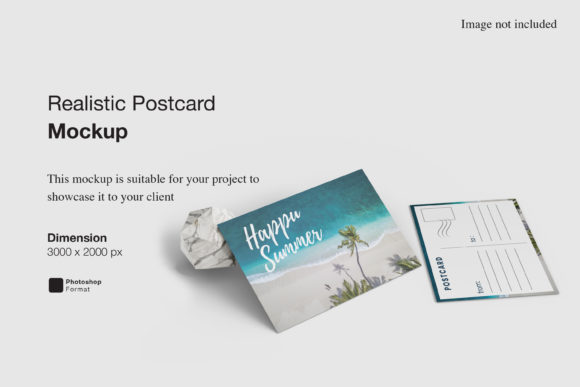
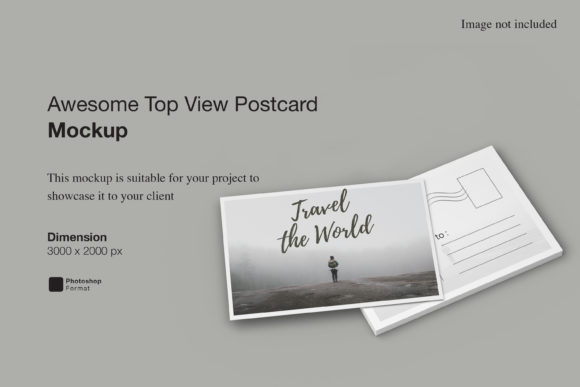
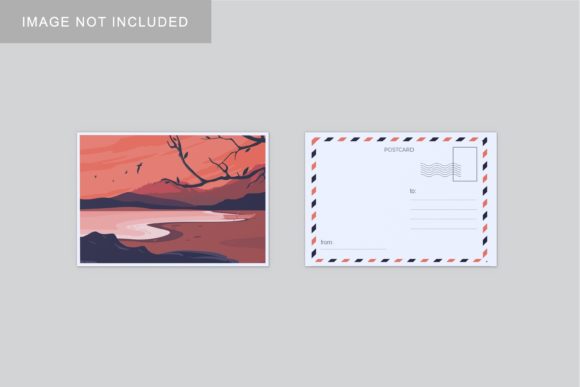
At its core, Postcard Mockup V3 is a Photoshop PSD file intended for professional visualization. It serves as a template where the primary design element—the postcard itself—is isolated within a smart object layer. This technical structure is the defining feature of the asset. Instead of manually masking, warping, and shading a design into a scene, which can be time-consuming and prone to error, users can simply double-click the designated layer. This action opens a separate window where the user places their own artwork. Upon saving and closing, the mockup automatically updates, applying realistic lighting, shadows, and perspective to the new design.
The asset is provided in high resolution, specifically sized at 3000x2000 pixels with a density of 300 DPI. These specifications ensure that the output is suitable for both digital presentations on high-resolution screens and potential print previews. The inclusion of a PDF help guide further supports users who may be less familiar with advanced Photoshop techniques, ensuring that the smart-object workflow remains accessible.
Key Features and Technical Specifications
When evaluating Postcard Mockup V3, several specific attributes contribute to its utility. Understanding these features helps determine if the asset aligns with your technical requirements.
- Smart-Object Integration: The most significant feature is the use of Adobe Photoshop Smart Objects. This non-destructive editing method allows for quick replacement of designs without altering the underlying lighting or texture of the mockup scene.
- Customizable Background: Unlike some rigid mockups that lock the environment, this version offers changeable background colors. This flexibility allows designers to isolate the postcard against a neutral backdrop for clean presentations or choose a color that complements the brand identity of the project.
- High Resolution Output: With dimensions of 3000x2000 pixels, the file provides ample pixel data for detailed viewing. The 300 DPI setting ensures sharpness, which is crucial when presenting physical-sized items like postcards where edge quality matters.
- User Support: The inclusion of a PDF guide addresses the learning curve associated with smart objects, making the tool viable for junior designers or those who do not use Photoshop daily.
Benefits for Designers and Agencies
The primary benefit of using Postcard Mockup V3 is efficiency combined with visual impact. In client meetings, showing a flat JPEG of a postcard design can sometimes fail to communicate scale and materiality. A 3D mockup instantly contextualizes the design, helping clients visualize how the final printed piece will look in their hands. This reduction in ambiguity can streamline the approval process, potentially reducing the number of revision rounds.
Furthermore, the ease of use offered by smart objects means that once the initial setup is understood, creating multiple variations becomes a matter of seconds. A designer can showcase the same layout in different color schemes or test two distinct creative directions simultaneously by swapping out the smart object layers. This capability is particularly valuable during brainstorming sessions or when presenting options to a client who needs to compare alternatives side-by-side.
Tradeoffs and Considerations
While Postcard Mockup V3 offers clear advantages, it is important to consider its limitations and requirements. First and foremost, the asset requires Adobe Photoshop. Users working exclusively with other design software such as Affinity Designer, Canva, or Figma will not be able to utilize this file directly. They would need access to Photoshop or a compatible alternative that supports PSD smart objects, though compatibility varies across platforms.
Additionally, the realism of the mockup is dependent on the quality of the source image used to create the 3D scene. While Postcard Mockup V3 aims for realism, it is a digital simulation. It cannot perfectly replicate the texture of specific paper stocks, foil stamping, or embossing unless those effects are digitally painted into the base mockup layers. Designers should manage client expectations by clarifying that the mockup represents a standard print finish unless otherwise specified.
Another consideration is the scope of the product. This mockup is specifically tailored for postcards. If a designer frequently works with business cards, brochures, or large-format posters, investing in a dedicated postcard mockup might feel restrictive. However, for specialists in direct mail or event invitations, this focused approach ensures higher fidelity than a generic "paper" mockup.
Situational Fit: Who Should Use This?
Postcard Mockup V3 is a strong fit for freelance graphic designers, marketing agencies, and in-house creative teams who regularly produce collateral for direct mail campaigns. It is particularly useful for:
- Client Presentations: Where visualizing the final product aids in securing buy-in.
- Portfolio Showcases: To demonstrate attention to detail and production knowledge.
- E-commerce Listings: For sellers offering pre-designed postcard templates, allowing them to show potential buyers exactly how the design will appear when printed.
Conversely, alternatives may be worth considering if you require extreme customization of the camera angle, lighting rig, or environmental context. While this mockup allows for background color changes, it does not offer the ability to rotate the postcard freely or change the shadow direction dynamically. For such needs, a more complex 3D model rendered in software like Blender or Cinema 4D might be appropriate, though these require significantly higher technical expertise and time investment.
Practical Decision-Making Insights
To determine if Postcard Mockup V3 aligns with your goals, assess your current workflow bottlenecks. If you spend considerable time manually distorting images to fit scenes, this tool offers a direct solution. Evaluate whether your existing library of mockups covers the specific format of postcards adequately; if not, adding a specialized asset like this can fill a gap in your resources.
Consider the frequency of your postcard projects. For occasional use, the cost-benefit analysis might lean toward free, lower-quality alternatives. However, for professionals who rely on speed and consistency, the time saved through smart-object integration justifies the acquisition of a premium, well-structured file. Finally, verify your software stack. Ensure that Photoshop is part of your standard toolkit, as the absence of this application renders the PSD file unusable.
In summary, Postcard Mockup V3 serves as a practical, efficient tool for elevating the presentation of postcard designs. By leveraging smart-object technology and high-resolution standards, it supports a professional workflow that prioritizes clarity and speed. While it requires specific software and has fixed geometric constraints, its ability to quickly transform flat designs into realistic 3D displays makes it a valuable asset for designers seeking to enhance their client communication and portfolio quality.