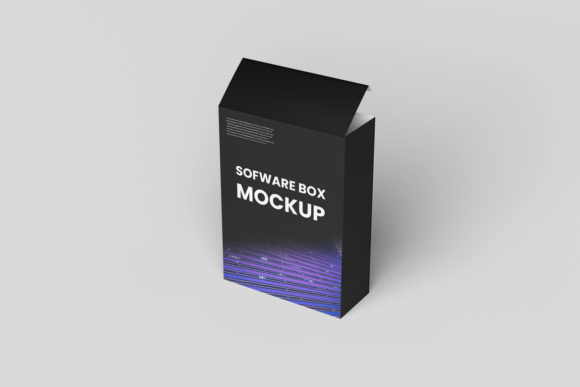
Software Box Mockup: Professional 3D Presentation Tool
In the digital age, software is rarely sold in physical boxes. Yet, the visual language of packaging remains a powerful tool for communication. Whether you are launching a new application, updating an existing product line, or simply need to present a concept to stakeholders, how your design looks matters immensely. This is where a Software Box Mockup becomes an indispensable asset. It bridges the gap between a flat digital file and a tangible, realistic representation that clients and users can instantly understand.
Many designers struggle with the disconnect between their creative vision and the final presentation. A flat JPEG of a box front might look clean on a screen, but it fails to convey depth, texture, and scale. By utilizing a high-quality mockup, you can showcase your designs professionally in a realistic 3D display. This shift from two-dimensional to three-dimensional visualization allows for a more immersive experience, helping audiences grasp the product’s identity before they even interact with the code itself.
The Power of Realistic 3D Visualization
Why does realism matter in software presentation? The answer lies in cognitive processing. Humans are visual creatures who process images faster than text. When you present a software product as a boxed item, you tap into familiar real-world associations. People understand what a "box" represents: a contained, complete, and valuable package. This psychological cue can elevate the perceived value of your digital product.
A Software Box Mockup provides this context without requiring you to hire a professional photographer or build a physical prototype. Instead of spending weeks waiting for a photoshoot, you can generate photorealistic renders in minutes. This speed is crucial in fast-paced industries like tech and marketing, where time-to-market often determines success. By replacing the design easily and quickly using smart-object features, you maintain momentum in your workflow while ensuring your presentations remain polished and consistent.
Simplifying the Design Workflow with Smart Objects
One of the most significant barriers to creating high-quality presentations is technical complexity. Traditional rendering software can be daunting, requiring steep learning curves and powerful hardware. However, modern mockups streamline this process through Adobe Photoshop’s smart-object technology. This feature is designed specifically for efficiency, allowing you to replace the current designs with your own within seconds.
Here is how it works in practice: you open the PSD file, double-click the smart object layer, paste your flat design (such as a .psd or .jpg), save the changes, and watch as the mockup automatically updates. The lighting, shadows, and perspective adjust dynamically to match your artwork. This means you do not need advanced skills in 3D modeling or lighting setup. You only need basic proficiency in Photoshop, making this tool accessible to freelancers, small business owners, and educators alike.
The availability of a PDF help guide further reduces friction. Even if you are not a Photoshop expert, clear instructions ensure you can navigate the file structure confidently. This support system transforms a potentially intimidating task into a simple, repeatable process. For agencies managing multiple client projects, this consistency is vital. It ensures that every deliverable meets a high standard of quality, regardless of which team member executes the final steps.
Technical Specifications That Matter
Not all mockups are created equal. When selecting a Software Box Mockup, technical specifications play a critical role in the final output quality. Resolution, dimensions, and flexibility determine whether your design will look crisp on a large monitor or pixelated on a billboard. This particular template offers a robust set of features designed to meet professional standards.
- High Resolution: At 300 dpi, the mockup ensures print-ready quality. This is essential if you plan to use the image for physical marketing materials, such as brochures or trade show banners. Low-resolution images can undermine the professionalism of your brand, so starting with a high-fidelity source is non-negotiable.
- Ideal Dimensions: The 3000x2000 px size provides ample space for detailed designs. This aspect ratio is versatile enough for web headers, social media posts, and portfolio pieces. It strikes a balance between horizontal framing and vertical detail, allowing your logo and typography to breathe.
- Changeable Backgrounds: Context is everything. A white background might work for a minimalist portfolio, but a textured surface or a colored backdrop could better suit a lifestyle presentation. The ability to change the background color allows you to tailor the mood of the image to fit specific campaign themes or brand guidelines.
Who Benefits Most from This Tool?
The utility of a Software Box Mockup extends across a wide spectrum of professionals. For entrepreneurs and startups, it offers a cost-effective way to validate ideas. Before investing in full-scale production or extensive development, founders can visualize how their app or service would look as a packaged good. This helps in securing early buy-in from investors who respond well to tangible representations of abstract concepts.
Marketers and advertisers benefit from the versatility of the format. They can create a series of variations—different colors, different angles, different backgrounds—to test which visuals resonate best with their audience. A/B testing becomes easier when you can rapidly generate multiple versions of the same asset without redesigning from scratch.
Freelancers and designers use these tools to enhance their portfolios. A strong portfolio demonstrates not just artistic skill, but also commercial awareness. Showing how a design looks in a realistic setting proves that you understand how your work will be used in the real world. It signals to potential clients that you care about the end result, not just the initial sketch.
Practical Applications and Use Cases
Beyond general presentations, there are specific scenarios where a Software Box Mockup shines. Consider a developer releasing a new plugin for a popular platform. Instead of just listing features in text, they can showcase the plugin as a sleek, branded box. This creates a sense of completeness and authority.
Similarly, educational institutions and publishers often bundle digital resources with physical materials. If you are creating a course kit that includes downloadable software alongside printed guides, a mockup helps unify the branding across both mediums. It reinforces the connection between the physical and digital components of your offering.
Even bloggers and content creators can leverage these images. In a review article, a high-quality image of the software box serves as a visual anchor. It breaks up text-heavy content and provides a focal point for readers. Since photos used in previews are typically for illustration purposes only, having your own unique mockup ensures that your content stands out from generic stock imagery.
Limitations and Considerations
While powerful, it is important to approach any template with a critical eye. A Software Box Mockup is a starting point, not a finished masterpiece. The quality of the final image depends heavily on the quality of the design you place inside the smart object. If your typography is poor or your color palette clashes, no amount of realistic lighting will save it. Therefore, always prioritize good graphic design principles before applying your work to the mockup.
Additionally, be mindful of the angle and perspective. Some mockups offer limited views. If you need a specific angle that isn't included in the template, you may need to seek a different resource or invest time in learning more advanced 3D editing techniques. Always compare options to ensure the mockup fits your specific needs regarding lighting, shadow softness, and box proportions.
Finally, remember that while a mockup adds realism, it cannot replace actual user testing. A beautiful box does not guarantee that the software inside is intuitive or bug-free. Use the mockup as a communication tool, not a substitute for rigorous development and quality assurance.
Conclusion
In a crowded digital marketplace, presentation is key. A Software Box Mockup offers a practical, efficient, and visually compelling way to communicate the value of your software products. By leveraging smart objects, high-resolution assets, and flexible backgrounds, you can create professional-grade visuals that engage your audience and support your business goals. Whether you are a seasoned designer or a solo entrepreneur, integrating these tools into your workflow can significantly enhance your ability to showcase your work with clarity and confidence.