Evaluating A5 Trifold Mockup V4 for Professional Design Presentations
Presenting design work effectively is often just as critical as the design itself. When creating marketing materials, brochures, or informational pamphlets, clients and stakeholders need to visualize how a flat digital file translates into a physical object. This is where high-fidelity mockups become an essential tool in the designer’s workflow. Among the various options available on digital marketplaces, A5 Trifold Mockup V4 has emerged as a practical solution for professionals seeking a realistic 3D display without the overhead of complex scene setup.
This evaluation explores the specific features, technical specifications, and use cases associated with this PSD-based asset. By analyzing its capabilities against standard industry practices, we can determine whether it serves as a robust addition to your presentation toolkit or if alternative approaches might better suit specific project requirements.
Understanding the Core Functionality
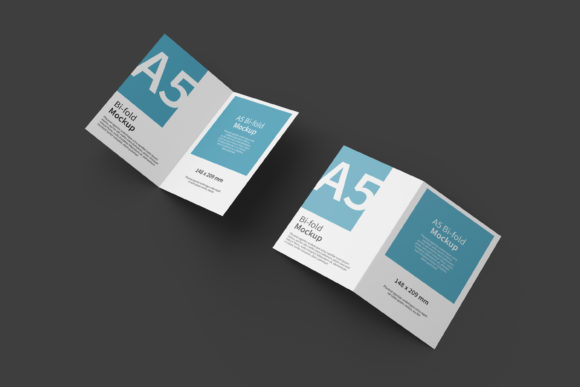
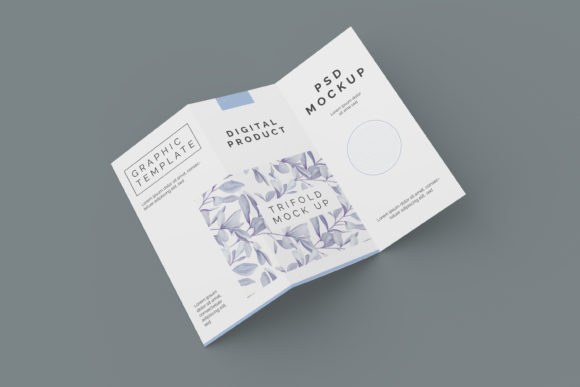
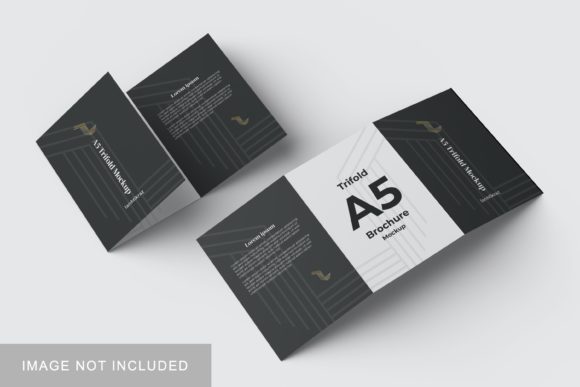
At its foundation, A5 Trifold Mockup V4 is a Photoshop document designed to simulate a real-world trifold brochure. The primary value proposition lies in its ability to provide a "realistic 3D display" that allows designers to showcase their artwork in a context that mirrors physical production. Unlike simple flat lay images, this mockup introduces depth, shadows, and perspective, which helps clients grasp the scale and tactile nature of the final product.
The format relies heavily on Adobe Photoshop’s smart-object technology. This feature is central to the user experience, allowing for rapid iteration. Instead of manually masking, warping, or distorting a client’s logo or layout onto a curved surface—a process that can be time-consuming and prone to error—users can simply double-click the designated smart layer. This opens a temporary window where the original design file can be edited and saved. Upon saving, the changes automatically update in the main composition, maintaining all lighting and perspective effects instantly.
Technical Specifications and Workflow Efficiency
For designers who prioritize efficiency, the technical parameters of A5 Trifold Mockup V4 are well-aligned with modern printing standards. The file resolution is set at 300 dpi, which is the industry benchmark for high-quality print output. Furthermore, the canvas size is 3000x2000 pixels. This dimension provides sufficient pixel density for both web-based previews and large-format printing if necessary, ensuring that details remain crisp even when zoomed in during presentations.
The inclusion of a changeable background-color adds another layer of versatility. In many professional scenarios, the background environment significantly influences the perception of the design. A dark, moody background might suggest luxury or sophistication, while a clean white or neutral gray background emphasizes clarity and minimalism. Being able to toggle these backgrounds within the same file structure means a designer can present multiple moods to a client without needing to generate entirely new files from scratch.
- Format: Native PSD (Photoshop) ensures compatibility with the most widely used graphic design software.
- Resolution: 300 DPI guarantees print-ready quality.
- Dimensions: 3000x2000 px offers flexibility for various display needs.
- Usability: Smart-object integration reduces editing time from minutes to seconds.
Comparative Analysis: Mockups vs. Alternative Presentation Methods
To understand the distinct advantage of using A5 Trifold Mockup V4, it is helpful to compare it with other common methods of presenting trifold designs. Designers typically choose between three approaches: flat digital views, 2D composite images, or 3D rendered mockups.
Flat Digital Views involve showing the unfolded layout as it appears in Illustrator or InDesign. While this is useful for reviewing typography and hierarchy, it fails to convey how the paper folds and interacts with space. Clients often struggle to imagine the final physical result from a flat screen, leading to potential misunderstandings about fold lines and bleed areas.
2D Composite Images attempt to fake depth by adding drop shadows and slight distortions to a flat image. While quicker to produce than full 3D renders, they often lack realism. The lighting rarely matches the subject, and the edges can appear artificial. This method is generally suitable for quick internal reviews but may fall short in high-stakes client pitches where visual fidelity matters.
3D Rendered Mockups, such as A5 Trifold Mockup V4, bridge the gap between speed and realism. They provide accurate lighting, texture, and perspective. However, traditional 3D rendering in software like Blender or Cinema 4D requires significant learning curves and processing time. The advantage of the PSD-based mockup is that it democratizes this level of realism. It delivers the visual impact of a 3D render with the ease of a standard Photoshop template. For most freelance designers and small agencies, this balance of quality and accessibility makes it a superior choice over building custom 3D scenes for every project.
Best-Fit Situations and Practical Applications
Not every design project requires a high-end trifold mockup. Understanding when to deploy A5 Trifold Mockup V4 ensures that resources are used effectively. This asset is particularly well-suited for the following scenarios:
- Client Presentations: When pitching brochure designs, showing the folded state helps clients visualize the end product. It demonstrates attention to detail and professionalism.
- Portfolio Showcases: For designers building their online presence, realistic mockups elevate the perceived value of their work. They make static portfolio pieces look like tangible, produced items.
- Social Media Marketing: The 3000x2000 px resolution is ideal for high-resolution posts on platforms like Instagram or LinkedIn. A realistic mockup stands out more effectively in a feed filled with flat graphics.
- Internal Quality Checks: Before sending a file to print, viewing it in a mockup can help identify issues with contrast or readability that might not be obvious in a flat view.
Conversely, if a project involves complex packaging structures, unusual paper stocks, or specialized finishes like embossing or foil stamping, a basic PSD mockup may have limitations. While A5 Trifold Mockup V4 simulates standard paper textures, it may not accurately replicate the reflective qualities of metallic foils or the deep indentation of heavy embossing. In such cases, a custom 3D render or a photograph of a physical prototype would be more appropriate.
Evaluating Limitations and Considerations
No single tool is perfect, and prospective users should be aware of certain constraints. First, the reliance on Photoshop means that users must have access to this software. While Photoshop is industry-standard, it may not be accessible to everyone, particularly those using free or open-source alternatives like GIMP, although some community plugins allow for limited smart-object functionality in other programs.
Additionally, the prompt notes that photos used in the preview are for illustration purposes only. This is a crucial distinction for buyers. The actual download will likely contain a clean, unbranded template. Users must supply their own imagery for testing. If you are looking for a pre-filled example to study color palettes or typography pairings, this specific asset may require additional creative input to populate the blank spaces.
Another consideration is the file complexity. While the smart-object feature simplifies the insertion of designs, advanced users who wish to modify the lighting direction, shadow intensity, or camera angle may find that the layer structure is optimized for ease of use rather than total artistic control. If you need to drastically alter the environmental lighting beyond changing the background color, you may need to rely on Photoshop’s adjustment layers and blend modes, which requires a higher level of proficiency.
Decision Factors: Is It Right for You?
Choosing between A5 Trifold Mockup V4 and other resources comes down to a trade-off between customization and convenience. If your primary goal is to quickly produce professional-looking presentation assets for standard A5 trifold brochures, this mockup offers a streamlined workflow. The combination of 300 DPI resolution, smart-object ease, and changeable backgrounds covers the vast majority of commercial needs.
However, if your work involves highly experimental formats, non-standard paper sizes, or a need for photorealistic material simulation beyond standard paper, you might benefit from investing time in learning 3D modeling tools or purchasing more specialized, physically scanned mockups. For the average graphic designer handling corporate identity projects, event brochures, or informational flyers, however, the efficiency gains provided by A5 Trifold Mockup V4 make it a compelling and practical investment.
In summary, the value of this mockup lies in its ability to save time while elevating the visual communication of design work. By removing the friction of manual manipulation and providing a realistic context, it allows designers to focus on the creative aspects of their pitch rather than the technicalities of presentation. For those seeking a reliable, easy-to-use tool to enhance their client deliverables, it represents a solid option in the current landscape of design resources.